

Plann Review 2026: Pricing, Features, Pros & Cons (Hands-On)

What Is Plann?
Plann (plannthat.com) is a social media scheduling tool built around visual planning, specifically for Instagram. It lets you drag and drop posts onto a grid preview of your Instagram feed before publishing, so you can plan how your profile looks in advance.
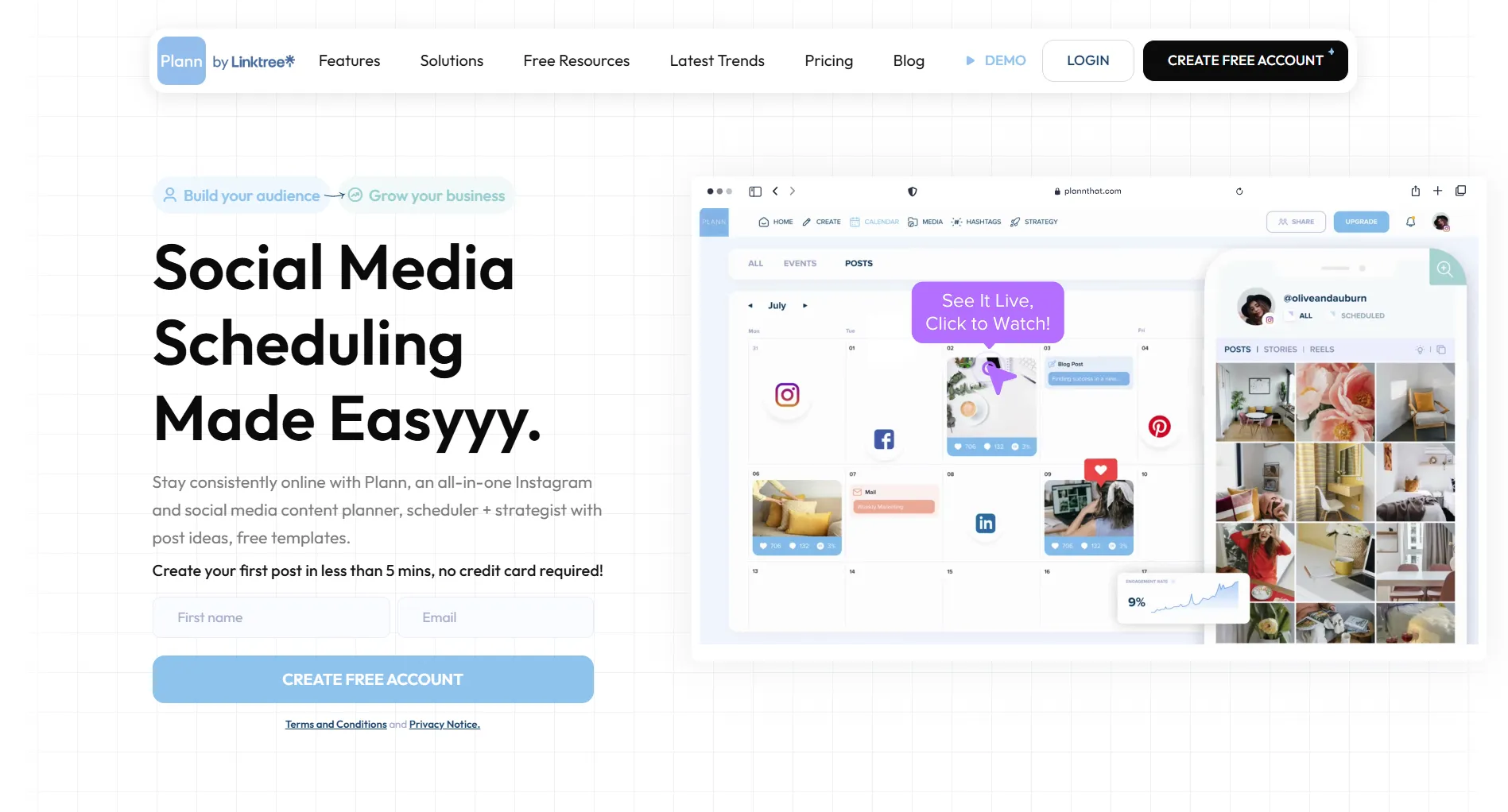
Beyond Instagram, Plann supports Facebook, TikTok, Pinterest, LinkedIn, YouTube Shorts, and Threads. It also includes built-in photo editing, hashtag management, and a basic AI caption generator.
Plann does not support X/Twitter or Bluesky.
Quick verdict: Plann is a solid choice if Instagram grid aesthetics are your top priority and you don't need X/Twitter support. The visual planner is genuinely best-in-class. But the AI features are basic, the free plan is very limited, and multi-brand pricing adds up fast.
Rating Overview
No numeric scores here on purpose. Review pages routinely print "4.2/5 for value" and similar, and those numbers measure nothing: there is no rubric behind them and no way to reproduce them. The column above says what we found instead.
Best for: Instagram creators and visual-first brands who care about feed aesthetics.
Not ideal for: Businesses that need X/Twitter support, advanced AI content generation, or multi-brand management on a budget.
Plann Pricing (2026)
Plann offers four tiers.
A correction worth leading with, because an earlier version of this page got it wrong and most comparisons still do: $12.50, $25 and $62.50 are the ANNUAL rates, not the monthly ones. Paying month to month costs $15, $30 and $75. If a review quotes Plann as starting at $12.50 without saying "billed annually", it has copied the annual figure into a monthly column.
Important notes on pricing:
- Each "social set" in Plann is one brand (one Instagram account, one Facebook page, etc.). If you manage multiple brands, you either need the Build or Grow plan, or you'll pay for additional social sets.
- The free plan is useful for testing the interface, but the upload limits make it impractical for regular posting. The realistic starting point is Power User at $15/month, or $12.50 if you commit annually.
- All paid plans come with a 7-day free trial, no credit card required.
For a deeper pricing breakdown, see our full Plann pricing guide.
What Plann Does Well
Visual Grid Planner
This is Plann's standout feature and the main reason people choose it over other schedulers.
The grid planner shows a preview of your Instagram profile grid. You drag and drop upcoming posts to see exactly how they'll look on your feed before they go live. You can rearrange, swap, and experiment with the order until the aesthetic is right.
If your Instagram strategy depends on a cohesive visual feed, common for fashion, food, travel, photography, and lifestyle brands, this is the feature that justifies Plann.
Built-In Photo Editing
Plann includes a photo editor so you don't need to switch to a separate app:
- 80+ professional filters
- Cropping, rotation, and adjustment tools (brightness, contrast, saturation)
- Text overlays and stickers
- Frames and borders
- Basic touch-up tools
It's not a replacement for Lightroom or Photoshop, but for quick edits and maintaining a consistent filter across your feed, it's convenient.
Multi-Platform Scheduling
Plann supports scheduling to:
- Instagram: Posts, Stories, Reels, Carousels
- TikTok: Video posts
- Facebook: Pages and Groups
- Pinterest: Pins
- LinkedIn: Personal and Company pages
- YouTube Shorts: Short-form video
- Threads: Text posts
Cross-posting lets you create once and publish across platforms with platform-specific adjustments.
Hashtag Manager
Plann's hashtag tools include:
- Hashtag suggestions based on your content
- Saved hashtag sets (create groups you reuse)
- Performance tracking to see which hashtags drive engagement
- Trending hashtag discovery
For Instagram in particular, where hashtag strategy still matters, this is a practical feature.
Content Resources and Canva Integration
Plann integrates with Canva (access to 450,000+ design templates directly within Plann), and includes stock image libraries from Pixabay and Pexels. There are also 50+ industry-specific content theme suggestions to help with planning.
Mobile App and Offline Mode
Plann has iOS and Android apps. The offline mode lets you plan and organize content without an internet connection, useful for creators who plan content while traveling.
What Plann Is Missing
No X/Twitter or Bluesky Support
This is Plann's biggest gap. If X/Twitter is part of your social media strategy, you'll need a separate tool entirely. Plann focuses exclusively on visual platforms.
For X/Twitter scheduling, alternatives include Buffer, SocialRails, or Typefully.
Limited AI Features
Plann has an AI caption generator, but it's basic. It can suggest captions and content ideas, but it doesn't offer:
- Full-length post generation with tone/voice control
- AI-generated video scripts or story ideas
- Bulk content generation
- AI image generation or editing
If AI-assisted content creation is important to your workflow, you'll find Plann's AI underwhelming compared to tools with more advanced AI capabilities.
No Video Editing or Templates
Plann is a scheduler, not a content creation suite. There's no built-in video editor, no template library for Reels or TikTok, and no carousel maker. You'll need separate tools (like Canva, CapCut, or Adobe Express) for video content creation.
Upload Limits on Lower Plans
The free plan has strict upload limits that make it impractical for regular use. Even the Power User plan has monthly caps. If you're a high-volume poster, you may need the Build or Grow plan.
Per-Brand Pricing Adds Up
Each additional brand ("social set") increases your cost. For agencies or freelancers managing multiple clients, this pricing model gets expensive compared to tools that offer unlimited brands on higher tiers.
Pros and Cons
What Real Users Say
Here's what users report across G2, the App Store, and Trustpilot:
What Users Praise
- Grid planner is the standout. Multiple reviewers call it the best visual Instagram planner available. The drag-and-drop interface and feed preview are consistently highlighted.
- Photo editing saves time. Users appreciate not needing to switch between apps for basic edits and filters.
- Easy to learn. Most users report getting started quickly without needing tutorials.
What Users Complain About
- Customer support can be slow. Some users on Trustpilot and the App Store report delays in getting responses to technical issues.
- Facebook re-authorization issues. Several users report needing to repeatedly reconnect their Facebook accounts.
- Occasional bugs on mobile. Some App Store reviewers mention crashes or content not saving properly.
- The free plan is too restrictive. Users trying the free tier often feel pushed to upgrade immediately due to strict limits.
Trustpilot rating: 2.5/5 (based on a small number of reviews, worth noting but not necessarily representative of the broader user base, as satisfied users rarely leave Trustpilot reviews for scheduling tools).
App Store rating: Generally higher, around 4.0+/5 with hundreds of reviews.
Who Should Use Plann
Plann Is a Good Fit For:
Instagram-focused creators: If your primary platform is Instagram and feed aesthetics matter to your brand, Plann's grid planner is worth the price alone.
Visual-first brands: Fashion, food, travel, photography, interior design, and lifestyle brands that rely on a cohesive visual identity across posts.
Small businesses on a budget: at $15/month, or $12.50 if you pay annually, it is one of the cheaper scheduling tools with a genuinely good core feature.
Pinterest marketers: Plann's visual planning approach works well for Pinterest pin scheduling alongside Instagram.
Look Elsewhere If:
You need X/Twitter support: Plann doesn't offer it at all. Consider Buffer or SocialRails.
You want advanced AI content creation: Plann's AI is basic. Tools with deeper AI features will save you more time on content creation.
You manage many brands: Per-brand pricing makes Plann expensive for agencies. Look for tools with flat-rate pricing that includes unlimited brands.
You're a video-first creator: Without video editing or templates, Plann isn't built for TikTok or Reels-heavy strategies.
Plann vs Alternatives
Quick Comparison
Plann and SocialRails prices below are current as of 3 August 2026. Later and Planoly change theirs often enough that quoting a figure here would date badly, so check their own pricing pages.
Plann vs Later
Both are strong Instagram visual planners. The main differences:
- Price: Plann starts at $12.50/mo vs Later at $25/mo
- Photo editing: Plann has more robust built-in editing
- Link in bio: Later offers Linkin.bio, Plann does not
- Platforms: Plann supports Threads; Later does not
- Analytics: Later has slightly deeper analytics on higher plans
Bottom line: Choose Plann for budget and photo editing. Choose Later if you need a link-in-bio tool.
Read the full Later vs Plann comparison →Plann vs Planoly
Bottom line: Plann supports more platforms at a lower price with better photo editing. Planoly has a simpler interface but covers fewer platforms.
Bottom Line
Plann is a well-built visual planning tool with the best Instagram grid planner on the market. If seeing your feed before you post is important to how you work, Plann delivers on that promise at an affordable price.
The gaps (no X/Twitter, basic AI, no video tools) mean it will not work as an all-in-one solution for everyone. But for Instagram-first creators and visual brands, it does its core job well.
Choose Plann if:
- Instagram feed aesthetics are central to your strategy
- You want built-in photo editing without leaving the scheduler
- Your platforms are visual-first (Instagram, TikTok, Pinterest)
- You're on a budget ($12.50/month is competitive)
Choose an alternative if:
- You need X/Twitter scheduling
- You want advanced AI content generation
- You need video editing or template tools
- You manage more than 2-3 brands
Create content, post everywhere
Create captions, images, and videos with AI. Schedule to 9 platforms in seconds.
Start your free trial
What is Plann?
Is Plann free?
How much does Plann cost?
Does Plann support X/Twitter?
Is Plann better than Later?
Does Plann have an app?
Can Plann schedule TikTok and Reels?
Does Plann have AI features?
Related
Plann Content
- Plann Pricing 2026 (Full Breakdown)
- Best Plann Alternatives
- Cheaper Than Plann
- Buffer vs Plann
- Later vs Plann
Similar Reviews
Best-Of Guides
Was this article helpful?
Let us know what you think!